Showing posts with label MSIX. Show all posts

Wednesday, June 11, 2025

W365: Windows App MSIX auto-update feature even if MS Store is blocked

 With the latest release of the Windows app 2.0.360.0, if a previous version 2.0.327.0 or higher was downloaded offline as an .msix format and installed, it now supports auto update even if the Microsoft Store app is blocked. 

Earlier this wasn't the case, auto update was not supported and admin have to download the msix new version again and perform the update manually or through Intune.  This was time consuming and we raised a feedback to support auto-update for the manually installed windows app as .msix format even if Microsoft store app was blocked in the enterprise.

Reference - what's new in Windows App

This feedback was properly listned by the Microsoft Product Team and they immediately added this feature to their roadmap and started working on it.  We had a wonderful opportunity to interact with the Microsoft product team through the Microsoft management customer connection program MCCP.  There were couple of focus groups, 1:1, feedback session and infact private previews offered to the members.  And I was also a part in all of these and shared my suggestions and private preview feedbacks. Only after all the feedbacks were positive and all worked well,  this amazing feature got released recently. A big thanks to all the product team members, community participation and Product managers that made this feature available for general public.

If you also like to interact with the product group directly like us then you can join the program by following the registration  link: https://www.aka.ms/JoinCCP (remember that a NDA with Microsoft is a need!)

You can also test this by manually downloading the .msix from here

You can download Windows App outside of the Microsoft Store from the following links:

After installing it,  make sure the Microsoft store app is blocked.  When a new version is released, the existing manually installed windows app will auto update as same like the rollout schedule like it happens in Microsoft store allowed.

Note:

The Windows app checks for updates once every 8 hours in the background and updates automatically only when the app is closed. If it discovers an update while open, the user will see the update banner and update available button in the settings panel.

Monday, March 3, 2025

W365: Windows App MSIX auto-update feature even if MS Store is blocked

With the latest release of the Windows app 2.0.360.0, if a previous version 2.0.327.0 or higher was downloaded offline as an .msix format and installed, it now supports auto update even if the Microsoft Store app is blocked. 

Earlier this wasn't the case, auto update was not supported and admin have to download the msix new version again and perform the update manually or through Intune.  This was time consuming and we raised a feedback to support auto-update for the manually installed windows app as .msix format even if Microsoft store app was blocked in the enterprise.

Reference - what's new in Windows App

This feedback was properly listned by the Microsoft Product Team and they immediately added this feature to their roadmap and started working on it.  We had a wonderful opportunity to interact with the Microsoft product team through the Microsoft management customer connection program MCCP.  There were couple of focus groups, 1:1, feedback session and infact private previews offered to the members.  And I was also a part in all of these and shared my suggestions and private preview feedbacks. Only after all the feedbacks were positive and all worked well,  this amazing feature got released recently. A big thanks to all the product team members, community participation and Product managers that made this feature available for general public.

If you also like to interact with the product group directly like us then you can join the program by following the registration  link: https://www.aka.ms/JoinCCP (remember that a NDA with Microsoft is a need!)

You can also test this by manually downloading the .msix from here

You can download Windows App outside of the Microsoft Store from the following links:

After installing it,  make sure the Microsoft store app is blocked.  When a new version is released, the existing manually installed windows app will auto update as same like the rollout schedule like it happens in Microsoft store allowed.

Note:

The Windows app checks for updates once every 8 hours in the background and updates automatically only when the app is closed. If it discovers an update while open, the user will see the update banner and update available button in the settings panel.

Friday, October 11, 2024

W365: Install Windows app as MSIX

Following previous post, let’s explore how to install the windows app as MSIX format.

First download the windows app msix file and open the location of the downloaded file and double click it to install. 


You can also install it through Powershell command 

Add-AppxPackage -path “path to downloaded msix file”

After installation, you can open the windows app shortcut to access the windows 365 cloud pc’s.

You can also confirm the installation by opening Powershell and running the below command.

Get-AppxPackage 


You can uninstall the windows app by running the below command in Powershell.

Remove-AppxPackage -Package MicrosoftCorporationII.Windows365_2.0.294.0_x64__8wekyb3d8bbwe

Note: MSIX version will not auto update if Microsoft store is blocked and update needs be done by downloading the MSIX again from the URL.

You can make the auto update to happen if you push the Windows App as Microsoft store app (new) from Intune to  the device and the Intune will take over management and upgrade the windows app. 

You need to make sure “Turn off Automatic Download and Install of updates” policy isn't enabled, only then Microsoft Store will automatically update the UWP/MSIX apps.

Friday, September 27, 2024

πŸ“₯⬇️ Windows App available for download as MSIX

Now you can simply download the MSIX version of the Windows App and install if you have the Microsoft Store App disabled in your environment.


Note:
If you have blocked the MS store app, then the manually installed MSIX version will not auto update. You need to download the latest version again and update.

Tip: 
Install the MSIX version manually first and later push out the update from Intune as Microsoft store App (New). This will check the installed method in the end user device and take over the management and auto update even though Microsoft Store is disabled for the end user.

Wednesday, March 8, 2023

MSIX Packaging Tool- 0x80131500 when building

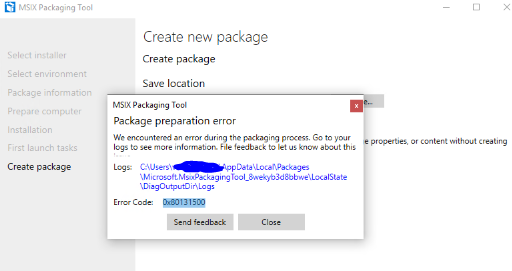
Recently tested converting TortoiseSVN msi package to MSIX using MSIX Package converter. Everything worked fine during monitoring phase and during build the tool struck up and showed an error code 0x80131500.


Capture.PNG


When checked for the msix log file it showed error stating duplicate ID's in the Appx manifest file.


[3/7/2019 6:38:14 AM] [Error] ERROR: PRI191: 0x80080204 - Appx manifest not found or is invalid. Please ensure well-formed manifest file is present. Or specify an index name with /in switch.

[3/7/2019 6:38:14 AM] [Error]

[3/7/2019 6:38:14 AM] [Error] error C00CE1A1: App manifest validation error: The app manifest must be valid as per schema: Line 20, Column 2554, Reason: 'f26e2640-0cff-43dc-8325-575a3261d885' is a duplicate key for the unique Identity Constraint '{http://schemas.microsoft.com/appx/manifest/foundation/windows10}Class_Id'.

[3/7/2019 6:38:14 AM] [Error]

Since there was no output generated other than the log file, it was hard to find a solution. So when checked in MSIX Techcommunity it seems it is an issue with MSIX tool build v1.2019.110.0. This issue is resolved in latest insider build v1.2019.304.0.


Thanks to JamesPike & Tim Mangan for confirming this issue and its resolution.


Release Notes : https://docs.microsoft.com/en-us/windows/msix/packaging-tool/release-notes/history


Download Free MSIX Packaging Insider Tool : https://docs.microsoft.com/en-us/windows/msix/packaging-tool/insider-program


Join MSIX TechCommunity : https://techcommunity.microsoft.com/t5/MSIX/ct-p/MSIX

Friday, July 13, 2018

Build your first MSIX Package using DAC

Microsoft is building up a MSIX Packaging Tool which we are expecting to be released pretty soon. Till then how to create a MSIX package? It's very easy. If you have used Desktop App Converter tool to create .appx package earlier then you are ready to create MSIX.

The steps to create MSIX are pretty same like how we create .appx using DAC. You can follow the below link to create your first MSIX package.

Project Centennial - First hands on Converting desktop apps to Universal Windows Platform (UWP)

There are some changes that needs to be followed regarding to requirements in the above link. Instead of writing those changes I have decided to share a link where it has been already well explained by Pascal Berger.

https://blog.basevision.ch/2018/07/how-to-create-an-msix-right-now-in-the-insider-preview-a-step-by-step-tutorial/

So why wait? Try out your first MSIX creation.

Friday, May 11, 2018

MSIX - The future universal format

MSBuild 2018 has officially announced  the new msix format,  and so now it's free to share information publically to all.

Since there are already quite few blogs and video's shared in msbuild,  I will  be sharing those links below which will be quite very useful.

MSIX - Inside and Out

Accelerating Windows 10 enterprise app deployment through MSIX

MSIX - pptx

MSIX First Look - Priya Saxena

Is MSIX the future for App-V - Tim Mangan

A blog by Kevin Kaminski

MSIX Intro

A closer look at MSIX

MSIX But what about App-V?

Steps to create MSIX - Pascal Berger


To Join MSIX Tech Community click here