Showing posts with label Error. Show all posts

Monday, December 1, 2025

W365: Fix Unable to connect Error code 0x5000056

When trying to access your assigned windows cloud pc through windows app in Windows device or any device - in this case ios windows App, you will be promoted with the unable to connect with error code 0x5000056


Even when you try to restart your cloud pc by clicking on three dots, it will show restart attempt failed. When you try to do inspect connection, it will also show as failed.

To fix this issue, follow the below steps. 

Click on your profile and select troubleshooting and select Reset subscription like below.


Click on reset subscriptions. This will delete your assigned windows 365 cloud pc from windows app. After this, click on + icon and add the cloud pc once again by signing into work or school account and entering your credentials.




Friday, March 29, 2024

Intune - Linux Intune portal app shows unable to check status


After Intune installation and logging in to register the device, the intune app shows unable to check status error, and clicking retry does nothing. In Intune, the device got registered but it shows as not evaluated.

Solution:

  1. Remove the device entry from Intune.
  2. In the client end open the terminal and run sudo apt remove intune-portal && sudo apt purge intune-portal
  3. Run sudo rm -f /home/[username]/.config/intune

Restart the machine and retry Intune installation this time, after that the device should report compliant/non-compliant status.

Wednesday, March 8, 2023

MSIX Packaging Tool- 0x80131500 when building

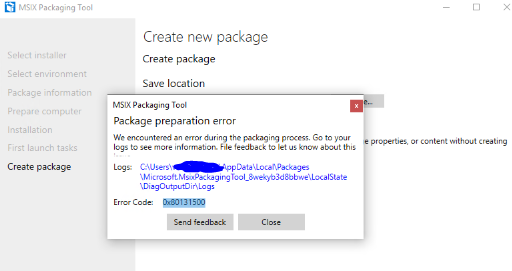
Recently tested converting TortoiseSVN msi package to MSIX using MSIX Package converter. Everything worked fine during monitoring phase and during build the tool struck up and showed an error code 0x80131500.


Capture.PNG


When checked for the msix log file it showed error stating duplicate ID's in the Appx manifest file.


[3/7/2019 6:38:14 AM] [Error] ERROR: PRI191: 0x80080204 - Appx manifest not found or is invalid. Please ensure well-formed manifest file is present. Or specify an index name with /in switch.

[3/7/2019 6:38:14 AM] [Error]

[3/7/2019 6:38:14 AM] [Error] error C00CE1A1: App manifest validation error: The app manifest must be valid as per schema: Line 20, Column 2554, Reason: 'f26e2640-0cff-43dc-8325-575a3261d885' is a duplicate key for the unique Identity Constraint '{http://schemas.microsoft.com/appx/manifest/foundation/windows10}Class_Id'.

[3/7/2019 6:38:14 AM] [Error]

Since there was no output generated other than the log file, it was hard to find a solution. So when checked in MSIX Techcommunity it seems it is an issue with MSIX tool build v1.2019.110.0. This issue is resolved in latest insider build v1.2019.304.0.


Thanks to JamesPike & Tim Mangan for confirming this issue and its resolution.


Release Notes : https://docs.microsoft.com/en-us/windows/msix/packaging-tool/release-notes/history


Download Free MSIX Packaging Insider Tool : https://docs.microsoft.com/en-us/windows/msix/packaging-tool/insider-program


Join MSIX TechCommunity : https://techcommunity.microsoft.com/t5/MSIX/ct-p/MSIX

Friday, April 15, 2016

Resolution - App-V generated MSI shows Client version 5.0 or above needs to be installed even though App-V Client is enabled in Windows 10 Build 14316

Even though App-V client is installed and been enabled, running the App-V generated msi shows the below error.


Resolution: Create a transforms for the generated MSI and remove the highlighted Installed OR APPV_CLIENT_INSTALLED launch condition.This should fix the issue temporarily.
For a permanent fix we need to wait for Microsoft to release its updated OS.


Friday, October 23, 2015

Management console generates “Could not load file or assembly Newtonsoft.Json” error - App-V 5.1 Support Tip

After upgrading the App-V 5.0 Service Pack 1 Database and Management Server, the following error is generated when loading the App-V management console:


Could not load file or assembly 'Newtonsoft.Json, Version=4.5.0.0, Culture=neutral, PublicKeyToken=30ad4fe6b2a6aeed' or one of its dependencies. The located assembly's manifest definition does not match the assembly reference. (Exception from HRESULT: 0x80131040)


To know more about resolving this issue click on the below official Microsoft TechNet link:


http://blogs.technet.com/b/appv/archive/2015/10/22/app-v-5-1-support-tip-management-console-generates-could-not-load-file-or-assembly-newtonsoft-json-error.aspx