Showing posts with label Windows 10 update 1703. Show all posts

Tuesday, October 30, 2018

Adobe Acrobat DC App-V & Windows 10 Issue - Resolved

Later have been seeing issues when removing earlier versions of Adobe Acrobat DC and installing newer version in windows 10 1703/1709 which has been explained very well in the below blog by Ryan Ververs-Bijkerk


https://www.logitblog.com/app-v-application-was-unable-to-start-correctly-on-windows-10/


The solution was to restart the machine and try again earlier. Now this is fixed with the release of new updates for windows 10.


1703 fixed in 2018.10 - KB4462939
1709 fixed in 2018.10 - KB4462932
1803 fixed in 2018.10 - KB4462933


Thanks to Tim Mangan for sharing this update information.

Tuesday, March 6, 2018

HotFix Released: App-V Applications worked in win 10 1607 fails in win 10 1703

Many packages that completely worked in inbox App-V in windows 10 1607 failed after upgrading to windows 10 1703. The reason for failure is due to Microsoft changed the way to load registries in containers CREG instead of usual virtual registry VREG.

There was a temporary fix which was available and Roy Essers posted it in twitter a long back.
It was adding the below registry entry manually in the 1703/1709 machines.


[HKEY_LOCAL_MACHINE\SOFTWARE\Microsoft\AppV\Client\Compatibility]
"RegistryCompatibilityMode"=dword:00000001


This issue is fixed in windows 10 1703 with the new hotfix released.


https://support.microsoft.com/en-us/help/4077528


We can clearly see that they have made use of the temporary fix to change the registry virtualization to use the VREG instead of the modern CREG that was mentioned earlier to permanently fix this issue.


Apart from the registry fix, this update also fixes many other App-V issues which can bee seen below.


This update will be downloaded and installed automatically from Windows Update.

Wednesday, February 14, 2018

App-V: Virtual Packages works in win 10 1607 but fails in windows 10 1703/1709

Many packages that completely worked in inbox App-V in windows 10 1607 failed after upgrading to windows 10 1703 and 1709 versions. The reason for failure is due to Microsoft changed the way to load registries in containers CREG instead of usual virtual registry VREG. To know about this change do have a look at the below articles from Tim Mangan.

http://www.tmurgent.com/TmBlog/?p=2692
http://www.tmurgent.com/TmBlog/?p=2733

There was a temporary fix which was available and Roy Essers posted it in twitter a long back.
It was adding the below registry entry manually in the 1703/1709 machines.


[HKEY_LOCAL_MACHINE\SOFTWARE\Microsoft\AppV\Client\Compatibility]
"RegistryCompatibilityMode"=dword:00000001


Microsoft has released an update earlier today which is supposed to fix this registry mapping issue.
https://support.microsoft.com/en-us/help/4074588


We can clearly see that they have made use of the temporary fix to change the registry virtualization to use the VREG instead of the modern CREG that was mentioned earlier to permanently fix this issue.


Apart from the registry fix, this update also fixes many other App-V issues which can bee seen below.


This update will be downloaded and installed automatically from Windows Update. If you would like to use the standalone package for this update, download it from the below link.


http://www.catalog.update.microsoft.com/Search.aspx?q=KB4074588

NOTE: This fix is supposed to be only for windows 10 1709. The article haven't mentioned anything about windows 10 1703. Will do a check in windows 10 1703/1709 and update how the fix has really helped to solve the issue.


Update: This issue is also fixed in windows 10 1703 with the new hotfix released.


https://support.microsoft.com/en-us/help/4077528


Monday, November 20, 2017

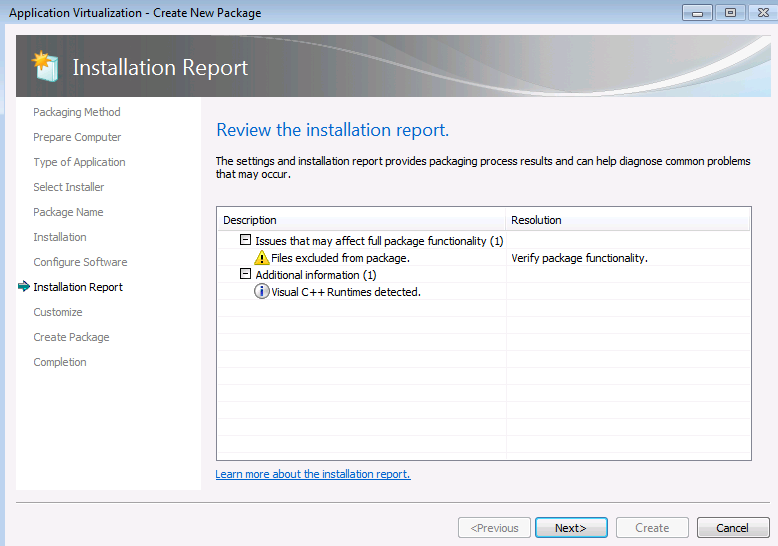
Sequence SPARX Enterprise Architect 13.5 - AppV 5.1

Select create a new virtual package.


Select create package.


Select standard package.


Select custom installation.


Type the name of the virtual package as Sparx Enterprise Architect 13.5.


Click Next and Install the application.


Remove the desktop shortcut. Select I am finished Installing.


If you need to do any post install configuration like adding new registration key,Launch the shortcut “Enterprise Architect” and do it here.Once done click Next.


Click Next and save the Package.


Publish and test the sequenced package in  the latest windows 10 environment.

Sunday, April 9, 2017

Windows 10 v1703 - Auto App-V unpublished package clean up

Earlier when we unpublish App-V packages it used to stay in the App-V cache location  and used to occupy unwanted storage space on the client machines. If we want to remove them to free up space we need to  do manual removal or using powershell command Remove-AppVClientpackage

With the release of the new windows 10 creators update v1703 App-V client provides options to automatically cleanup the unpublished packages.It requires restart.

This option can be enabled either by PowerShell or group policy or Registry.

PowerShell:


Open PowerShell as administrator and run the below code.

Set-AppvClientConfiguration -AutoCleanupEnabled 1


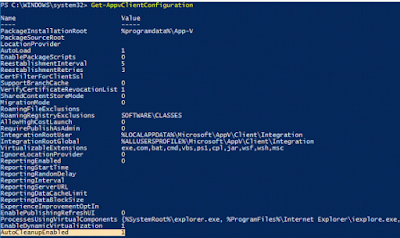
Run the below code to get the status.

Get-AppvClientConfiguration


Group Policy:

Go to Administrative Templates-System-App-V-PackageManagement-Enable automatic cleanup of unused appv packages and select enabled.

Registry:

HKLM\SOFTWARE\Microsoft\AppV\Client\PackageManagement
AutoCleanupEnabled 
REG_DWORD 1

Finally Microsoft have provided the much awaited feature to its users.